Proxima Documentation
Proxima is an open-source, local-first developer platform combining a Multi-AI Model Context Protocol (MCP) server with a closed-loop Autonomous Python Coding Agent. It enables developers to route frontier AI models (ChatGPT, Claude, Gemini, Perplexity) and offline local models (Ollama, LM Studio) directly into modern IDEs (Cursor, VS Code, Windsurf, Antigravity) with zero cloud relay proxies.
Model Context Protocol (MCP) →
Standardized JSON-RPC 2.0 stdio server exposing 40+ developer tools, real-time web search, code review, multi-model consensus debate, and session routing partitions directly to your IDE.
Autonomous Coding Agent →
Python background engine daemon running at localhost:8500 featuring closed-loop AST error self-healing, Chrome DevTools (CDP) automation, and 4 SQLite memory vaults.
Routing Modes
Proxima supports three primary execution engines designed to balance cost, privacy, and reasoning power:
| Mode | Cost | Providers | Technical Architecture & Reference |
|---|---|---|---|
| 1. Session Routing (Default) | 100% Free | ChatGPT, Claude, Gemini, Perplexity | Automates free browser logins inside isolated Chromium partitions (BrowserViews). Intercepts internal WebSocket/REST streams. Zero API keys or subscriptions required. Read the Session Routing Guide → |
| 2. BYOK (Bring Your Own Key) | Official API Pricing | OpenAI, Claude, DeepSeek (V3/R1), Groq, xAI, OpenRouter, Mistral, NVIDIA NIM | Direct official APIs. All API keys encrypted locally using OS native keychain via Electron SafeStorage. Automatic context compaction and token tracking. |
| 3. Local Offline Hardware | Free & Offline | Ollama, LM Studio, vLLM, LocalAI | Runs open-weight models (Llama 3, DeepSeek-Coder, Qwen 2.5) entirely on local GPU/CPU. 100% air-gapped, zero data leaves machine. Read the Local Models Guide → |
Installation
Requirements
- Node.js 18+ (for core Electron Hub, MCP stdio server, and CLI)
- Python 3.10+ (required for the Autonomous Agent engine & SQLite memory vaults)
- Windows 10 / 11 — pre-built standalone installer available
- macOS & Linux — supported via source build and Electron
Option 1: Windows Installer (Recommended)
Download the latest signed release binary from GitHub. This automatically initializes the Node server, desktop tray app, and virtual environment for the Python Agent.
Option 2: Run from Source
Clone the official repository from GitHub (Zen4-bit/Proxima) and install dependencies:
Configuration
1. MCP Server Configuration (IDEs)
Add this to your AI coding app's MCP configuration (Cursor, VS Code, Claude Desktop, Antigravity, etc.):
Tip: You can copy the exact pre-filled configuration JSON directly from the "Settings" tab inside the Proxima desktop application.
2. Autonomous Agent Environment & Ports
The Python Autonomous Agent engine uses the following local loopback interfaces:
| Service / Port | Protocol | Description |
|---|---|---|
http://localhost:8500 | HTTP / REST | Autonomous Agent Web Dashboard, live state observer, and task dispatcher. |
ws://127.0.0.1:9222 | WebSocket | Chrome DevTools Protocol (CDP) remote debugging port for automated browser sessions. |
~/.proxima-agent/ | SQLite 3 | Directory containing the 4 local memory databases (vault.db, insights.db, memory.db, skills.db). |
Search Tools
Tools for retrieving information from the web.
| Tool Name | Description |
|---|---|
deep_search |
Comprehensive web search for detailed topics. |
internet_search |
General internet search on any topic. |
github_search |
Find open-source repos, code, and solutions on GitHub. |
reddit_search |
Search Reddit discussions and threads. |
news_search |
Get the latest news articles on a topic. |
academic_search |
Find scholarly papers and research. |
Code Tools
Utilities for generating, debugging, and optimizing code.
| Tool Name | Description |
|---|---|
verify_code |
Check code against best practices and linting rules. |
explain_code |
Get detailed explanations of complex code snippets. |
generate_code |
Generate boilerplate or specific function implementations. |
convert_code |
Convert code between languages or frameworks. |
optimize_code |
Suggest performance improvements. |
review_code |
Comprehensive code review feedback. |
Development Tools NEW
Advanced tools for solving problems and building projects.
| Tool Name | Description |
|---|---|
solve | One-shot problem solver — senior engineer level. |
fix_error | Root cause + exact fix for any error. |
build_architecture | Full project architecture blueprint. |
write_tests | Auto-generate tests (jest / vitest / mocha / pytest). |
explain_error | Error explained in plain terms, no jargon. |
conversation_export | Export full conversation history from any provider. |
Agentic & Workflow Tools v5.0.0
Tools supporting multi-agent collaboration, structured workflows, and state logs.
| Tool Name | Description |
|---|---|
crew | Spawn a collaborative swarm of models to code, critique, and optimize. |
run_workflow | Execute multi-step tasks requiring chaining and logic gates. |
run_loop | Run an iterative refinement or compilation/test correction loop. |
proxima_agentic_status | Agent diagnostics, connection states, and active parameters. |
proxima_cost_report | Generate comprehensive token usage and billing cost reports. |
Autonomous Agent Engine v5.0.0
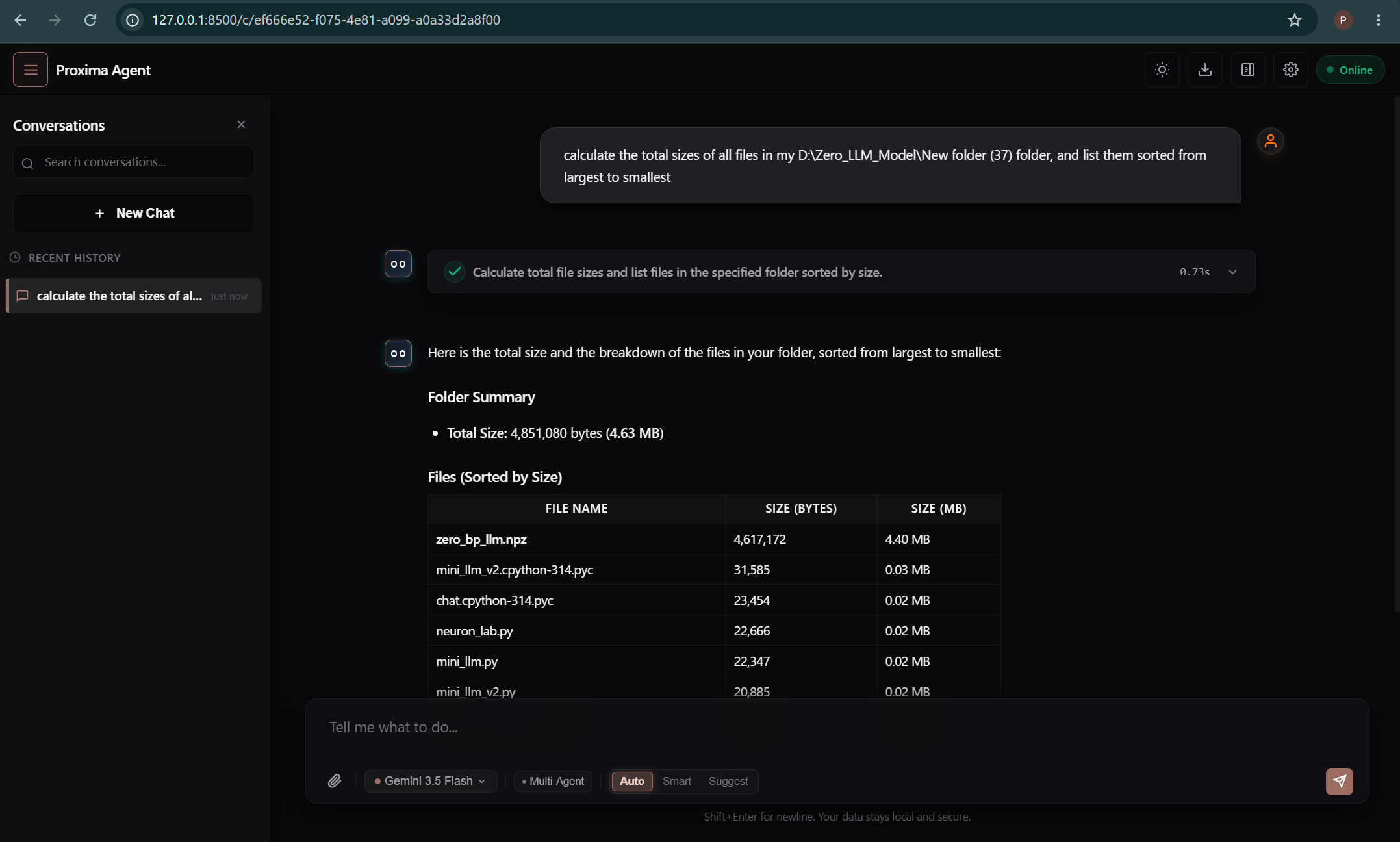
Proxima includes a built-in Autonomous Python Agent runtime designed for closed-loop software debugging, automated test verification, and Chrome DevTools Protocol (CDP) browser automation.
http://localhost:8500 with live task execution monitoring, workspace inspection, and execution safety controls.
1. Execution Safety Modes
The agent supports 3 safety permission tiers depending on your workflow:
Auto: Full autonomous execution for rapid scripting, code refactoring, and test suite execution.Smart(Default): Reads files and runs non-destructive commands automatically; prompts for confirmation if a system command risk score exceeds safety thresholds.Suggest: Strictly displays proposed code changes as unified git diffs, waiting for manual developer approval before applying.
2. The 4 Local SQLite Memory Vaults
All persistent state, experience memory, and learned patterns are stored locally in SQLite databases inside ~/.proxima-agent/:
| Database Vault | Function & Stored Data |
|---|---|
vault.db | Full conversation histories, session lineages, and branch trees. |
insights.db | Workspace facts, technology stack preferences, and environment parameters. |
memory.db | Compiler error signatures paired with verified code diff solutions. |
skills.db | Procedural automation runner scripts ranked by Bayesian execution success. |
3. Browser Automation via Chrome DevTools Protocol (CDP)
The agent connects directly to Chromium instances over WebSocket port 9222, enabling direct accessibility tree inspection, DOM coordinate bounding boxes, full-page screenshot verification, and synthetic keyboard/mouse interaction without heavy testing drivers.
Multi-AI Tools
Orchestrate multiple AI providers.
| Tool Name | Description |
|---|---|
ask_chatgpt | Directly query ChatGPT. |
ask_claude | Directly query Claude. |
ask_gemini | Directly query Gemini. |
ask_perplexity | Directly query Perplexity (web search + citations). |
ask_all_ais | Query all providers simultaneously. |
ask_selected | Pick specific providers to query. |
compare_ais | Compare responses side-by-side. |
smart_query | Auto-picks best provider for the query. |
chain_query | Sequential multi-AI pipeline — pass output between providers. |
debate | Multi-provider debate with FOR / AGAINST / NEUTRAL stances. |
verify | Cross-provider verification with confidence score. |
security_audit | Code security scan — CRITICAL / HIGH / MEDIUM / LOW. |
Analysis & Content Tools
Analyze documents, extract data, and generate content.
| Tool Name | Description |
|---|---|
analyze_file | Upload and analyze a local file. |
review_code_file | Code review on a local file (bugs, performance, security). |
analyze_document | Analyze documents from URL. |
extract_data | Extract structured data from text or URL. |
summarize_url | Summarize any URL. |
brainstorm | Generate ideas on any topic. |
fact_check | Fact verification. |
get_ui_reference | UI/UX design consultant — colors, layouts, CSS tokens. |
CLI Tool NEW in v5.0.0
The proxima CLI lets you use any AI provider from your terminal.
Install
From the app: Settings → ⚡ Install CLI to PATH
From source: npm link (Windows) or sudo npm link (macOS/Linux)
Commands
Pipe Support
REST API v5.0.0
OpenAI-compatible REST API at http://localhost:3210. Enable in Settings → REST API & CLI.
Endpoints
Example
model: "all" to query all providers at once, or model: ["claude", "chatgpt"] for specific ones.
WebSocket NEW in v5.0.0
Real-time streaming AI at ws://localhost:3210/ws. Requires REST API to be enabled.
Example
Security & Privacy
Proxima is architected with a strict local-first security model. No telemetry, code snippets, prompt histories, or API keys are ever transmitted to Proxima servers.
| Security Principle | Technical Implementation |
|---|---|
| Local-First Loopback | MCP/IPC (:19222), REST/WS (:3210), and Agent HTTP (:8500) bind exclusively to 127.0.0.1. Zero public internet ports are opened. |
| Credential Isolation | Session mode reuses existing local browser cookies inside sandboxed views. BYOK API keys are encrypted at rest using OS keychain hardware encryption (Electron SafeStorage). |
| Zero Telemetry | No analytics, tracking pixels, or diagnostic telemetry exist in the codebase. Only your explicit prompt payloads reach the AI providers you select. |
| Gated Agent Safety | The Python agent includes 3-tier safety execution gates (Auto, Smart, Suggest) preventing unauthorized bash commands or destructive file system overwrites. |
| SSRF Guardrails | The web_scrape tool and internal HTTP fetchers validate DNS targets against private IP blocks (10.0.0.0/8, 192.168.0.0/16, 169.254.0.0/16) to prevent SSRF vulnerabilities. |
Testing Strategy
Proxima maintains strict test suites across both the JavaScript Electron Hub and the Python Autonomous Agent runtime:
For details on our mock-at-boundary testing methodology and continuous integration coverage, see TESTING.md on GitHub ↗.
Contributing & Community
Contributions to Proxima are welcome! Whether you are implementing new MCP tool handlers, improving session interception, or enhancing agent self-healing loops, please follow our standard guidelines:
- Workflow: Fork ➔ Feature Branch ➔ Pull Request on GitHub (Zen4-bit/Proxima).
- Code Guidelines: Review our Contributing Guide (CONTRIBUTING.md) for architectural patterns and style conventions.
- Community Standards: All contributors and community members are expected to follow our Code of Conduct (CODE_OF_CONDUCT.md).
Sponsors & Backers
Proxima is an independent open-source project supported by developer sponsors.
Special thanks to Star Sponsor @TheNetworker. Support ongoing open-source development on GitHub Sponsors (Zen4-bit) ↗.
Troubleshooting
Windows Firewall Prompt
Proxima runs locally on localhost:19223, localhost:3210, and localhost:8500. Click "Allow" — only accepts local loopback connections from your machine.
Provider shows "Not logged in"
Click the provider tab in the desktop application and complete standard browser login. Use email OTP codes for ChatGPT, Claude, and Perplexity. Gemini uses session cookies from your active browser.
MCP Tools not appearing in IDE
- Ensure Proxima is running in your system tray or terminal.
- Verify the absolute file path in your MCP config (use the Copy button in Settings).
- Restart your coding environment (Cursor, VS Code, Windsurf, or Antigravity).
CLI: "proxima" not found
Open a fresh terminal window after installation. If still unresolved, click 🔧 Fix in Settings → CLI inside the Proxima desktop app or run npm link from source.
CLI: "Cannot connect to Proxima"
Proxima must be running and the REST API must be enabled. The CLI connects to http://localhost:3210. See the CLI & SDK Guide →.
WebSocket won't connect
The WebSocket stream shares the REST API server daemon. Enable the REST API in Proxima Settings first.
License & Terms
Proxima is licensed under the Proxima Personal Use License (Personal, Non-Commercial use only).
Review the full license terms and conditions in the official LICENSE file on GitHub ↗. For commercial or enterprise licensing inquiries, please contact the repository author or reach out via @Zen4-bit.